NLP UDC PAST PAPER 24-06-2023

چار آپشن میں سے کسی ایک پر کلک کرنے سے جواب سرخ ہو جائے گا۔
مائیکروسافٹ ورلڈ میں کون سی کلید پورے متن کو منتخب کرنے کے لیے استعمال ہوتی ہے؟
- CTRL + T
- CTRL + U
- CTRL + Z
- CTRL + A
اس سوال کو وضاحت کے ساتھ پڑھیں
Explanation
Ctrl + A use for select all.
Ctrl + B use for bold selection.
Ctrl + C use for Copy selected text.
Ctrl + X use for Cut selected text.
Ctrl + N use for Open new document.
ND23-6-2023
تورات کس نبی پر نازل ہوئی؟
- Hazrat Issa
- Hazrat Mussa
- Hazrat Ibrahim
- Hazrat Dawood
اس سوال کو وضاحت کے ساتھ پڑھیں
Explanation
"Torah" means "Law" in Hebrew.
The Torah has a range of meanings.
It refers to the first five books of the Hebrew Bible.
It is also known as the Five Books of Moses or Chameesha Choomshey Torah in Hebrew.
It encompasses the laws and teachings given to the Israelites.
The Torah contains 187 chapters and 5,852 verses.
There are four Holy Books
- The Torat revealed to Musa
- The Zabur revealed to Dawud
- The Injil (Gospel) revealed to Isa
- The Quran was revealed to Muhammad.
- for
- in
- on
- is
اس سوال کو وضاحت کے ساتھ پڑھیں
Explanation
She is waiting for you
Wait + for = کسی بندے یا چیز کا انتظار کرنا
Wait + At = کسی جگہ پر انتظار کرنا
PROSTITUTE کے متضاد الفاظ
- hooker
- whore
- courtesan
- honor
اس سوال کو وضاحت کے ساتھ پڑھیں
Explanation
PROSTITUTE جسم فروشی
honor عزت
ND23-6-2023
- vagary
- whimsey
- whimsy
- reasonableness
اس سوال کو وضاحت کے ساتھ پڑھیں
Explanation
caprices خواہشات
reasonableness معقولیت
ND23-6-2023
- pantheism
- panatheism
- pantheeism
- panntheism
اس سوال کو وضاحت کے ساتھ پڑھیں
Explanation
Pantheism in Urdu is "اصنام پرستی"
ND23-6-2023
- nominal account
- personal account
- real account
- dummy account
اس سوال کو وضاحت کے ساتھ پڑھیں
Explanation
A Joint Venture Account is a Nominal Account.
A joint venture is an arrangement in which two or more parties agree to pool their resources for the purpose of a specific task or transaction.
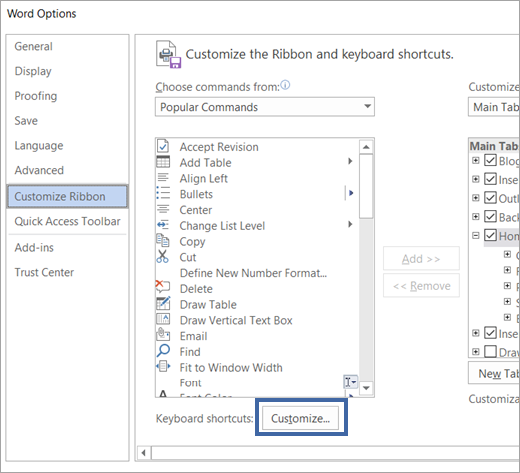
مائیکروسافٹ ورڈ میں کون سی خصوصیت آپ کو اپنی مرضی کے کی بورڈ شارٹ کٹ بنانے کی اجازت دیتی ہے؟
- Macros
- Customize Ribbon
- Quick Access
- AutoCorrect option Toolbar
اس سوال کو وضاحت کے ساتھ پڑھیں
Explanation
Go to File > Options > Customize Ribbon.
At the bottom of the Customize the Ribbon and Keyboard shortcuts pane, select Customize.