PPSC JUNIOR CLERK PAST PAPERS AND SYLLABUS

فری تیاری کیلے وٹس ایپ
گروپ جوائن کریں
Click here or Click here
چار آپشن میں سے کسی ایک پر کلک کرنے سے جواب سرخ ہو جائے گا۔
ایم ایس پاورپوائنٹ میں ہم ______ تک اگلی سلائیڈ پر جا سکتے ہیں؟
- Mouse
- Enter button
- Space bar
- All of these
اس سوال کو وضاحت کے ساتھ پڑھیں
Explanation
In MS PowerPoint, you can advance to the next slide using:
- Mouse: By clicking the mouse button
- Enter button: By pressing the Enter key on your keyboard
- Space bar: By pressing the Space bar on your keyboard
Additionally, you can also use other methods such as:
- Using the arrow keys (→ or ↓)
- Using the Page Down key
- Using the mouse wheel
- Using the presentation remote (if you have one)
علی گڑھ کالج کے بورڈ آف ٹرسٹیز کا پہلا سکریٹری کس کو مقرر کیا گیا؟
- Hakeem Ajmal khan
- Sir Syed Ahmad Khan
- Syed Muhammad
- None of these
اس سوال کو وضاحت کے ساتھ پڑھیں
Explanation
- Sir Syed Ahmed Khan Got Knowledge From Farid Ud Din (Maternal-grandfather – Ex Mughal Pm)
- Joined Gov’t In 1839 => Clerical Job naib munshi (administrative assistant)
- Promoted As Sub-judge 1841
- Transferred To Delhi Chief Judge In 1846
- Member Of Imperial Council 1886
- Aligarh Movement Objective:
- 1. Modern Education For Muslims To Compete Hindus
- 2. Cooperation With The British Government
- 1. Schools • Muradabad (1859) • Ghazipur (1863)
- 2. Scientific Society At Gahazipur (1864)
- 3. Muhammadan Educational Conference 1866
- 4. Muhammadan Anglo-oriental College =>
- Mao High School was Established in 1875
- Got Status Of College 1877
- Status Of University 1920
ایم ایس ورڈ ہر _____ کے بعد دستاویز کو خود بخود محفوظ کریں؟
- 10 minutes
- 20 minutes
- 30 minutes
- None of these
اس سوال کو وضاحت کے ساتھ پڑھیں
Explanation
MS Word's AutoRecover feature automatically saves documents at regular intervals.
The default interval is 10 minutes, but this can be adjusted in Word's settings.
میل مرج ٹیب _____ میں ہے؟
- Mailing
- Combining
- Registers
- None of these
اس سوال کو وضاحت کے ساتھ پڑھیں
Explanation
The Mail Merge tab is found under the Mailing tab in Microsoft Word.It provides tools for creating and managing mail merge documents.It including combining documents with recipient lists to send customized emails, letters, or labels.
گھر میں کلپ بورڈ _____ کے لیے استعمال ہوتا ہے؟
- Storage of letters
- Cut and paste
- Copy and paste
- None of these
اس سوال کو وضاحت کے ساتھ پڑھیں
Explanation
The Clipboard in the Home tab is used for copying and pasting text or data between different parts of a document or between different applications.It temporarily stores data that has been cut or copied, allowing it to be pasted elsewhere.
صفحہ کی سمت بندی کی کتنی اقسام ہیں؟
- 4
- 2
- 3
- None of these
اس سوال کو وضاحت کے ساتھ پڑھیں
Explanation
Page orientation refers to the way a page is aligned or rotated for printing or display.
There are two main types of page orientation:
- Portrait (vertical)
- Landscape (horizontal)
Landscape is an example of page orientation, where the page is rotated to have a wider width than height.
ایکسل میں اقدار کو ٹھیک کرنے کے لیے ہم _____ استعمال کرتے ہیں؟
- Thumbnails
- Thread
- Absolute reference
- None of these
اس سوال کو وضاحت کے ساتھ پڑھیں
Explanation
In Excel, an absolute reference (e.g., $A$1) is used to fix a cell's value, Ensuring it does not change when copied or dragged to other cells.It is achieved by adding dollar signs ($) before the column and row in the cell reference.
مندرجہ ذیل میں سے کون سا دستاویز کا نام اور معلومات دکھاتا ہے؟
- Title Bar
- Format
- Insert tab
- None of these
اس سوال کو وضاحت کے ساتھ پڑھیں
Explanation
The Title Bar displays the document name and application information at the top of the window.It helps identify the open file and often includes controls like minimize, maximize, and close.
ایم ایس ورڈ 2016 میں، اسکرین شاٹ موجود ہے؟
- Insert
- Review the bar
- Options menu
- Backstage view
اس سوال کو وضاحت کے ساتھ پڑھیں
Explanation
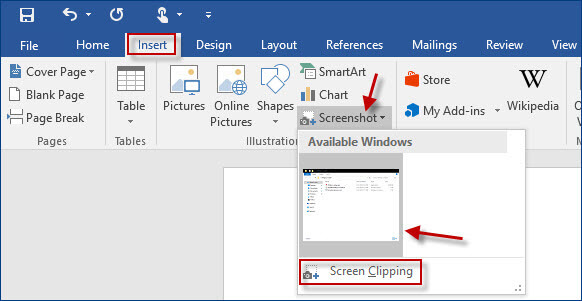
مندرجہ ذیل میں سے کون آپ کو ایک پریزنٹیشن میں ایک سے زیادہ سلائیڈ منتخب کرنے کی اجازت دیتا ہے؟
- Shift + Click each slide
- Ctrl + Click each slide
- Alt + Click each slide
- None of these
اس سوال کو وضاحت کے ساتھ پڑھیں
Explanation
Holding Ctrl and clicking on individual slides allows you to select multiple non-consecutive slides in a presentation.This is useful for applying changes or moving selected slides as a group.

